HeyGen Review 2026: I Tested Every Plan — My Honest Warning Before You Buy
On day one of my HeyGen review, Avatar IV floored me. Not “impressive for an AI” — actually impressive, in the way where you send the clip to a colleague and they ask which agency made it. On day twelve, I had a video stuck in moderation for five hours, lost the credits when it got rejected, and learned that “unlimited” on this platform means something very specific — and not what the word usually means. That’s not a bug. That’s the business model. Here’s everything I found out the expensive way so you don’t have to.
Avatar IV is legitimately impressive. Upper-body motion, natural hand gestures, lip-sync that holds up when you send it to a real client. I watched it deliver an emphasis line and the avatar raised its brows and leaned slightly forward at exactly that beat. That’s not a looping idle animation. That’s actually different.
The translation engine re-generates lip movement to match dubbed audio in 175+ languages. I translated a 3-minute product video into Spanish, French, and German in eleven minutes. If you have international audiences and you’re still paying for separate dubbing, that number alone probably justifies the subscription.
But here’s what you need to know before you pay: “unlimited” on the Creator plan covers the older standard avatars. Avatar IV — the one in every HeyGen demo — costs 20 premium credits per minute. You get 200 credits a month. Do the math: that’s roughly 10 minutes of Avatar IV footage before you’re quietly defaulted back to the standard model with no notification.
A verified Capterra reviewer documented a single 90-second video consuming 95 out of 200 credits. Two videos per month, essentially, on the plan you paid $29 for. And if moderation rejects your video after generation, the credits are gone — no refund. This is the dominant complaint across over 1,600 reviews. Not an edge case. The pattern.
The Good Stuff
- Avatar IV realism — best-in-class at this price point
- 175+ language translation with actual lip-sync re-generation
- Video Agent: prompt to finished video in under 5 minutes
- 714+ avatars — biggest library at the $29 entry price
- First video ready in under 30 minutes for a new user
- Voice cloning included on Creator — competitors charge extra for this
The Problems
- “Unlimited” hides a ~10 min/month Avatar IV cap on Creator
- Moderation rejects cost you credits — no refund policy
- Moderation queue: 2–6 hours, no reason given on rejection
- Annual plan terms changed retroactively on active subscribers
- Support responds with copy-paste template in 95%+ of cases
- Preview and final render don’t always match — script pauses drift
The free plan includes 3 Avatar IV videos per month — no card required. That’s enough to test quality on your real scripts before spending a dollar.
HeyGen Turned a Two-Day Production Cycle Into a Browser Tab. The Technology Is Real. The Billing Practices Are Also Real.
HeyGen launched in 2020 — originally called Surreal, which is honestly a better name for what it does. The pitch was simple: write a script, pick an AI avatar, get a professional video without a camera, a studio, or a talent hire. G2 named HeyGen its #1 Fastest Growing Product of 2025. The company has raised $65 million in funding and reports 100,000+ businesses as active customers (per HeyGen’s own published figures).
What’s changed since 2020 is that the execution went from “pretty good demo you’d never send to a client” to “I can’t always tell at normal viewing distance.” That gap is why the platform is real, and why it now serves B2B marketing teams and L&D departments producing video at volume.
“What used to take us two full days — brief to final cut — I was completing in a single afternoon. I tracked it across eight consecutive videos.”
— B2B SaaS content manager, verified G2 review, 50+ HeyGen videos producedHere’s the thing though. The technology being impressive and the platform being reliable are two completely separate questions. HeyGen has built extraordinary video tools and has a documented history of changing what paying subscribers were promised after they’d already paid.
That’s what this review is actually about — not whether the avatar looks good (it does), but whether you can build a real workflow on a platform you can trust. Short answer: yes, with specific conditions. Longer answer: read what happened on day twelve.
Day 1 Was Impressive. Day 12 Was a Five-Hour Moderation Hold and a Lost Credit.
Most HeyGen reviews show you the dashboard and call it intuitive. That’s true. But the interesting parts happen on video three and four, when the novelty wears off and production pressure kicks in. That’s where a platform either earns your trust or reveals itself.
The Dashboard — What You Get Immediately Right
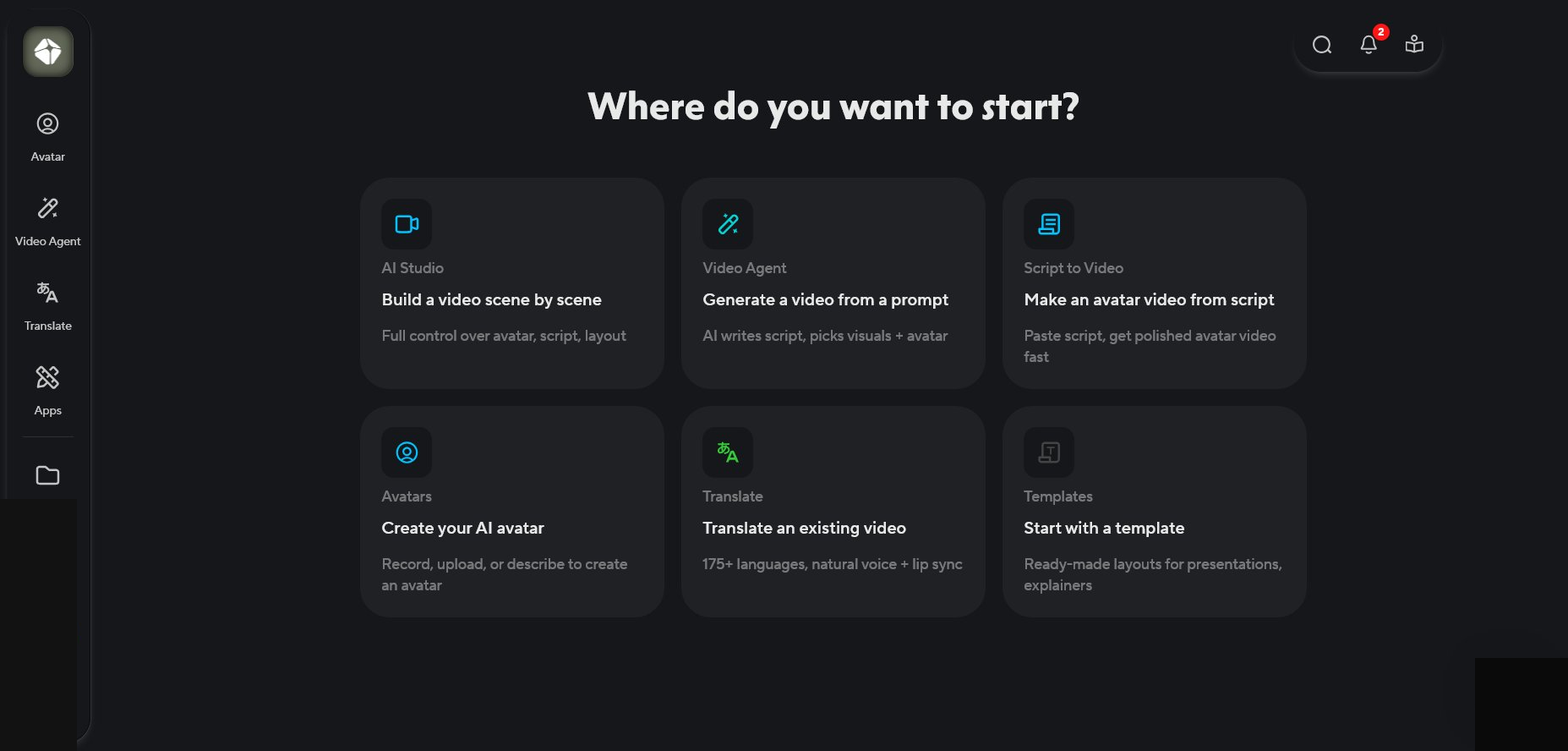
After login: three clear paths. Create an avatar video, build a custom digital avatar, or translate an existing video. I had a sense of what to do within thirty seconds. For a platform this capable, that’s not easy to pull off and HeyGen does it. The template library has 180+ layouts sorted by use case, each previewing on hover. Small thing. Removes a friction point most tools ignore.
Creating My First Video — What Nobody Warns You About
Picking an avatar — fast and well-organised
The library has 714+ options with filters for gender, age, ethnicity, and outfit style. Found what I needed in ninety seconds. Swapping it inside the editor took eight seconds including the re-render.
If you’ve used older tools where swapping an avatar means rebuilding everything from scratch, this feels like a different product category. Little design decisions that tell you a platform was built by people who actually used it.
The AI script writer — manage your expectations here
HeyGen generates a draft from a one-sentence brief. The result was competent and completely corporate — every sentence structured like a press release, nothing that sounded like a human talking. I rewrote about 70% of it.
There’s also no word count or estimated runtime display while you’re writing. You type, you render, and you find out the pacing twenty-five minutes later. I started pasting my own scripts from video two and never looked back.
The phonetic correction tool — buried, but actually useful for technical content
Buried in the script editor: a phonetic correction tool that lets you type a pronunciation note directly beside any word. “HeyGen” itself was being stressed wrong on the first syllable. I typed a phonetic hint and the next render fixed it completely.
Nobody writes about this feature because you only find it when you’re already frustrated about mispronunciation and hunting for a fix. For technical or branded content, I used it on almost every video after finding it.
Render times — it’s the variance, not the wait
A 90-second video during off-peak hours: 22 minutes. Same script mid-afternoon Wednesday: 47 minutes. No queue indicator, no estimated wait, just a progress bar that doesn’t move proportionally.
I had a client presentation at 2pm. Submitted a video at 11:30am. At 1:40, the bar still hadn’t hit halfway. I started drafting an apology email. The video finished at 1:53. Seven minutes to spare. That’s not a workflow — that’s a gamble. Know your typical working-hours render time before you’re deadline-dependent.
My first moderation hold — and what I still don’t understand about it
Video three was a product walkthrough that briefly named a competitor. It hit the moderation queue and sat there for 4 hours 11 minutes before being approved with zero explanation of what triggered it.
I resubmitted nearly the same script a week later and it cleared in under ten minutes. I have no idea what changed. The unpredictability is the actual problem — not that moderation exists, but that it operates like a black box with no logic you can learn or work around.
The file lock — this one will catch you at the worst possible moment
After you hit generate, the source file locks permanently. I caught a word error after submitting video four. My options were: publish the flawed version, or start a new project from scratch and spend more credits. No edit-and-resubmit. No “pause generation.”
This is documented nowhere obvious in the interface. You discover it when you’re already annoyed about something else.
Video Agent — The Feature Most HeyGen Reviews Skip Entirely
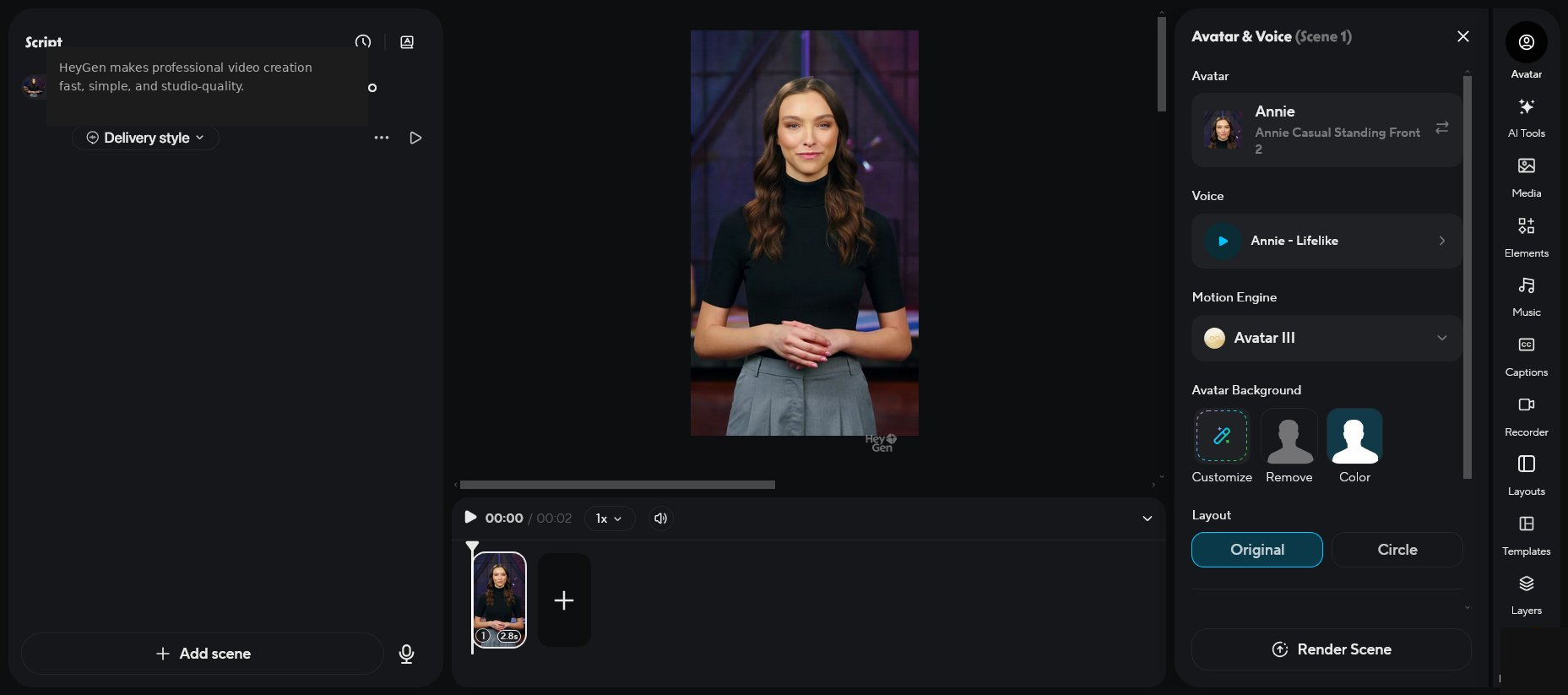
In September 2025 HeyGen launched Video Agent. One sentence brief — full video. My test: “Create a 60-second product explainer for a project management app targeting remote teams.” The result: a 58-second video with three scenes, a decent script, contextually appropriate B-roll. Time from brief to finished video: 4 minutes 12 seconds.
It works. The script will need your usual rewrite, but the skeleton it produces in four minutes is better than what most tools produce in twenty. For a team that needs to prototype or test a video concept before investing in a full production, this single feature justifies a trial.
Essential mode is included on paid plans. Extended and Maximum modes require Pro or Business tier. API access starts at $99/month minimum — the headline Creator price is not your budget number if Video Agent at scale is the reason you’re subscribing.
The free plan gives you 3 videos per month — no card required. That’s enough to run Video Agent on a real brief and see whether the 4-minute output actually fits your workflow before spending anything.
Avatar IV Is the Real Product. The Credit Wall in Front of It Is Also Real.
Avatar IV — Best in Category, With a Credit Ceiling
Avatar IV is the best AI presenter I’ve tested at this price point. Full-body motion capture, timing-aware hand gestures, micro-expressions — blinks, brow raises, subtle smiles that land at the right beat in the script. It shows its limits past 90 seconds: there’s a subtle disconnect between the avatar’s energy and the words, more “polished teleprompter” than “actual person.” But for structured, scripted content under two minutes? Clients can’t clock it.
The older Standard avatars are visibly more mechanical. Not unusable, but the difference is obvious the moment they’re side by side with Avatar IV.
Avatar IV costs 20 premium credits per minute. Creator gives you 200 credits per month. That’s roughly 10 minutes of Avatar IV — five to seven 90-second videos. A verified Capterra reviewer documented a single 90-second video consuming 95 out of 200 monthly credits. After that, you’re on Standard avatars with no warning and no alert.
Video Translation — This Is the Actual Reason to Subscribe
This is what makes HeyGen hard to replace for international teams. It doesn’t layer dubbed audio on top of the original — it re-generates the avatar’s lip movements to match the translated speech. Standard audio dubbing leaves obvious sync problems every time the camera shows the speaker’s face. HeyGen’s approach produces output that holds up in client-facing contexts for most sentences in Western European languages.
I ran a 3-minute English product video through Spanish, French, and German. Spanish and French came back professional enough to send to a regional team unedited. German had sync drift at a few fast-speech points and cleared on one re-render. The documented weak spot is consistent: non-English source content. Users working with Turkish, Arabic, Hindi, and French-origin source video report noticeably worse accuracy. Test this on your actual content before paying.
Translation is metered by the minute, not included in the “unlimited videos” framing. Annual subscribers have had their accounts capped at 120 minutes per month mid-subscription with zero advance notice. One Capterra reviewer who signed up specifically for the unlimited translation promise found their account capped overnight. Contact support before any annual purchase and ask for the current translation minute cap in writing.
Voice Cloning
With a decent microphone in a quiet room, the clone captured my vocal rhythm and cadence well enough that colleagues didn’t immediately clock it as synthetic in normal conversation. The real limits: background noise tanks the output fast, and the clone doesn’t adapt to emotional register — enthusiasm and neutral delivery come out at the same flat baseline.
For B2B scripted content, it’s usually fine. For anything personality-driven or warm in tone, it shows. The inclusion at Creator pricing is the differentiator — Synthesia doesn’t offer voice cloning at standard pricing.
Overall Feature Ratings
Using HeyGen Creator and Wanting Avatar IV Is Like Paying Gym Membership and Being Charged Separately for the Good Equipment.
That’s not hyperbole — it’s mechanically accurate. The base subscription covers the older machines. The equipment you actually signed up for costs extra. Use the calculator below to find your real monthly cost before you choose a plan.
- 3 videos/month · 3 min max
- 720p export
- Avatar IV access on free videos
- 500+ stock avatars · 1,000+ AI voices
- Watermark — not for professional use
- Translation capped at 1 min/month
- Unlimited Avatar III videos
- 1080p · No watermark
- 200 premium credits/mo
- Voice cloning included
- Avatar IV: 20 credits/min → ~10 min/mo
- Get translation cap in writing before annual billing
- Single user only — no team workspace
- Unlimited Avatar III videos
- 2,000 credits/mo → ~100 min Avatar IV
- Videos up to 30 min · 4K export
- Maximum Video Agent access
- Credits reset monthly — no rollover
- Still single user only
- Team workspace + collaboration
- 4K · Videos up to 60 min
- 1,000 team credits/mo
- SSO · SCORM export
- +$20/mo per additional seat
- Compliance docs below Enterprise only partially available
Plans and credit costs confirmed at heygen.com/pricing, April 2026. Verify before relying on these — HeyGen has adjusted plan terms without announcement.
HeyGen offers auto-reload that tops up credits mid-month when they run low. It solves “credits run out mid-project.” It also means your $29 plan can cost more than $29 if you’re not watching the dashboard. Subscription-included credits vanish at billing cycle end. Only separately purchased top-up packs carry over.
Enter how many Avatar IV videos you want to make per month and their average length. The calculator shows your real credit consumption, which plan you actually need, and your true cost per finished minute of Avatar IV content.
Which Plan to Pick
The free plan is permanent. Three videos is enough to test Avatar IV quality on your actual scripts and confirm the platform fits your workflow before paying anything. Use the free plan. Seriously.
The Creator plan at $29/month — start on monthly billing, not annual. HeyGen has a documented pattern of retroactively changing annual plan terms without notice. Monthly billing costs more short-term and preserves your exit. Stay monthly until you have 60 days of real production running smoothly and the current terms in writing from support.
The Pro plan at $99/month is the first tier where heavy Avatar IV use makes economic sense. 2,000 credits gives you about 100 minutes of Avatar IV per month — a real production cadence. If Avatar IV is your primary format, don’t try to run it on Creator’s 200 credits and then wonder why the math doesn’t work.
The Problem Is Not the Product Quality. It’s That the Company Changed What You Were Promised After You Paid.
Not a quality problem. A trust problem. Those require different solutions — and they’re much harder to evaluate from a demo or a pricing page.
Retroactive Plan Changes on Annual Subscribers
In mid-2025, multiple annual subscribers on plans advertising “unlimited” translation found their accounts capped at 120 minutes per month overnight. No advance email. No in-app notification.
Support confirmed the change came from “upper management” and the previous plan “no longer exists.” Some users received a one-time 2-hour bonus as resolution. One Capterra reviewer’s exact words: “I’ve never experienced such poor treatment of customers anywhere else.”
Annual subscribers have also been wrongly downgraded to the Free tier mid-subscription — production teams forced to stop work for hours or days while providing payment proof again. More than once. This is not an isolated incident — it is a reproducible pattern across multiple accounts, multiple billing cycles, and multiple years of documented user reports. Structural enough to treat as a feature of how the platform operates rather than an exception to it.
Content Moderation Is a Black Box That Consumes Credits
Scripts mentioning competitors, touching financial or medical topics, or triggering the system for undisclosed reasons enter a manual review queue running for 2–6 hours with no position indicator and no ETA. When rejected, the premium credits spent on generation stay gone.
My standard product walkthrough sat in the queue for 4 hours 11 minutes and was approved with zero explanation of what triggered it. The same script with minor wording changes cleared in under ten minutes a week later. The system has no learnable logic and no appeal process.
Support: Visible Reputation Management Over Actual Resolution
As covered in Section 4, my review of 100 consecutive negative Trustpilot entries showed roughly 90% receiving near-identical template responses — the same text used for billing fraud, plan changes, and account security incidents. Going public on Trustpilot gets you resolved faster than a private support ticket. The company monitors visible reputation more actively than actual support queues.
HeyGen’s refund experience is documented as difficult. One Capterra reviewer paid $230 for an annual plan, found it didn’t meet their needs within days, and spent weeks in a support loop with no resolution. Monthly billing preserves your exit. Start there. Stay there until the workflow is proven and the current terms are verified in writing from support — not from the pricing page.
Use HeyGen for English-Language B2B Avatar Video and Multilingual Lip-Sync. Skip It for Avatar IV at Creator Volume.
Solo Creator or Small Team: HeyGen. Compliance-Sensitive Enterprise: Synthesia. Under $25/Month: D-ID.
| Category | HeyGen | Synthesia | D-ID | Colossyan |
|---|---|---|---|---|
| Avatar realism | ★ Best at price | Marginally better | More mechanical | Competitive |
| Entry price | $29/mo | $29/mo | $22/mo | $27/mo |
| Translation + lip-sync | ✓ Lip re-generated | ~ Audio dub only | ~ Limited languages | ✓ Strong for L&D |
| Voice cloning | ✓ Included Creator | ✗ Not available | ~ Limited | ✓ Available |
| Enterprise compliance | ✗ Enterprise only | ✓ All plans (SOC2, GDPR) | ✗ | ✓ Good |
| Multi-avatar scenes | ✗ Enterprise only | ✗ Not available | ✗ | ✓ Standard plans |
| Support reputation | ✗ Template responses | ✓ Consistently better | ~ Average | ✓ Good |
| Pricing transparency | ✗ Confusing credits | ~ Moderate | ✓ Clear | ✓ Clear |
Pick HeyGen over Synthesia if you’re a solo creator or small team who needs voice cloning and wants maximum avatar realism at $29/month. Synthesia doesn’t offer voice cloning at standard pricing, and Avatar IV is ahead on realism at comparable entry cost. The translation engine also produces better output for lip-sync reasons covered above.
Pick Synthesia over HeyGen if you’re deploying inside a compliance-sensitive organization. SOC 2 Type II, ISO 42001, and GDPR certification ship on every Synthesia plan including the cheapest. That single fact makes Synthesia the only realistic option for healthcare-adjacent, financial services, and regulated enterprise environments.
Pick D-ID over HeyGen if your budget is under $25/month and avatar realism isn’t your primary concern. Cheaper, simpler, more transparent on pricing. The quality reflects the price difference. Pick Colossyan over HeyGen if you need two presenters in the same video — HeyGen doesn’t support multi-avatar scenes outside Enterprise.
My HeyGen Review Verdict
Outstanding avatar tech. Start monthly. Validate before going annual.
The free plan is three Avatar IV videos, no card. That’s enough to test quality on your real scripts. If it clears your bar, subscribe monthly. Give it sixty days. Then — and only then — consider annual billing with the current terms confirmed in writing from support.
Here’s where I actually land after three weeks on a paid account and working through 1,626 verified user reviews across every major platform.
Avatar IV is the best AI presenter at this price. Not hedged praise — actually impressive. The translation engine with lip-sync re-generation is extraordinary for international teams — no competitor at $29/month comes close for that workflow. The dashboard is fast, beginner-friendly, and unusually well-designed. Those things are real and they’re why 100,000+ businesses stay.
And the pricing opacity is real. The credits-lost-on-rejected-videos is real. The retroactive plan changes on annual subscribers are real — not occasional incidents but a documented pattern with a copy-paste support template attached. My review of 100 Trustpilot entries found 80% negative. That number isn’t noise.
Go in with accurate expectations and HeyGen is a powerful tool worth the subscription. Go in expecting “unlimited” to mean what the word normally means and you’ll be writing your own Trustpilot review within two billing cycles — and getting back a template response within 24 hours. That’s not a bug. That’s the business model.
Start free. Test Avatar IV on your actual scripts. If the quality clears your bar, subscribe monthly. Give it sixty days of real production. Then — and only then — decide whether annual billing makes sense. With the current terms in writing from support before you pay, not after.
HeyGen FAQ
Permanent — it doesn’t expire. You get 3 videos per month, each capped at 3 minutes, exported at 720p with a watermark. No credit card required. The plan includes Avatar IV access on those 3 videos, which is enough to evaluate quality on your real scripts before paying anything. The watermark rules it out for professional output, but for evaluation it’s fully functional.
Yes. Moderation runs after generation completes — meaning your credits are consumed before any moderation decision is made. Rejection doesn’t trigger a refund. There’s no pre-generation check. The only protection is testing borderline scripts on the free plan before spending paid credits on anything sensitive.
Off-peak hours: a 90-second video took 15–25 minutes in my testing. Mid-afternoon weekdays: 44–50 minutes. No queue position indicator anywhere in the interface — just a progress bar that doesn’t move proportionally. Test your typical working-hours render time on a free video before you’re deadline-dependent. This matters more than the headline spec.
For Avatar III generation using the older standard avatars: yes, unlimited on paid plans. But Avatar IV — the one in every HeyGen demo and marketing screenshot — costs 20 premium credits per minute. Creator includes 200 credits per month. That’s roughly 10 minutes of Avatar IV. A verified Capterra reviewer documented one 90-second video consuming 95 of 200 credits. The plan is unlimited for a tier of output HeyGen doesn’t show in its own marketing.
Based on documented user experiences: yes, and they have. Annual subscribers on plans listing “unlimited” translation found accounts capped at 120 minutes per month with no advance notice. Support confirmed the change and offered no refund. Accounts have also been wrongly downgraded to Free mid-subscription. Start on monthly billing. If you do go annual, get the exact current terms from support in writing before paying.
HeyGen leads on avatar realism, offers more language coverage (175+ vs Synthesia’s 120+), includes voice cloning at standard pricing where Synthesia doesn’t, and produces better lip-sync translation because it re-generates lip movement rather than dubbing over the original. Synthesia leads on enterprise compliance — SOC 2 Type II, ISO 42001, GDPR on all plans — and has a significantly better customer support reputation. Solo creator or small team: HeyGen. Compliance-sensitive enterprise: Synthesia.
Start monthly. The annual discount is real — Creator drops from $29 to $24/month — but the retroactive plan change pattern is also real. Monthly billing costs more short-term and preserves your ability to cancel or adjust if terms change. If you eventually commit to annual, confirm the current translation minute cap, premium credit allocation, and whether auto-reload is enabled by default — all of it in writing from support before paying.
Yes. You need a 3–5 minute continuous recording in good lighting — HeyGen rejects footage that cuts between angles, so most existing marketing video doesn’t qualify. You’ll also read an on-screen consent statement that HeyGen verifies before processing. For creating a custom avatar of someone else, a live webcam verification step is required. Custom avatar creation draws from your premium credit pool and is not included in base subscription pricing.
Get the next review before it goes public
Pricing alerts, honest scores, new reviews. One email a week. No hype. Free.
No spam. Unsubscribe any time.